Progression
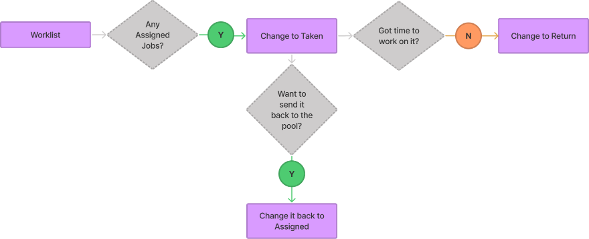
We studied how technicians manage cable locate jobs across different workflows, including worklist navigation, bulk actions, and job detail interactions. Participants varied in experience and job volume, completing tasks using unfinished mockups to simulate real workflows. The goal was to understand how technicians:
- prioritize urgent jobs
- scan and interpret worklists
- navigate between job details
- take action efficiently

Several consistent patterns emerged across testing:
Urgent jobs were easy to miss
Technicians relied on clear visual indicators to identify “hot” tickets and strongly preferred red highlights for urgency.
Table view supported scanning better
Most users preferred table layouts for quickly interpreting large sets of job data.
Technicians wanted to act directly from the worklist
Changing status, assigning jobs, and managing workflows without leaving the list was seen as critical.
Information hierarchy mattered more than layout alone
Fields like address, cross street, and ticket status were essential for decision-making.
Merged job details reduced friction
Users preferred seeing all relevant information in one place rather than navigating between tabs.

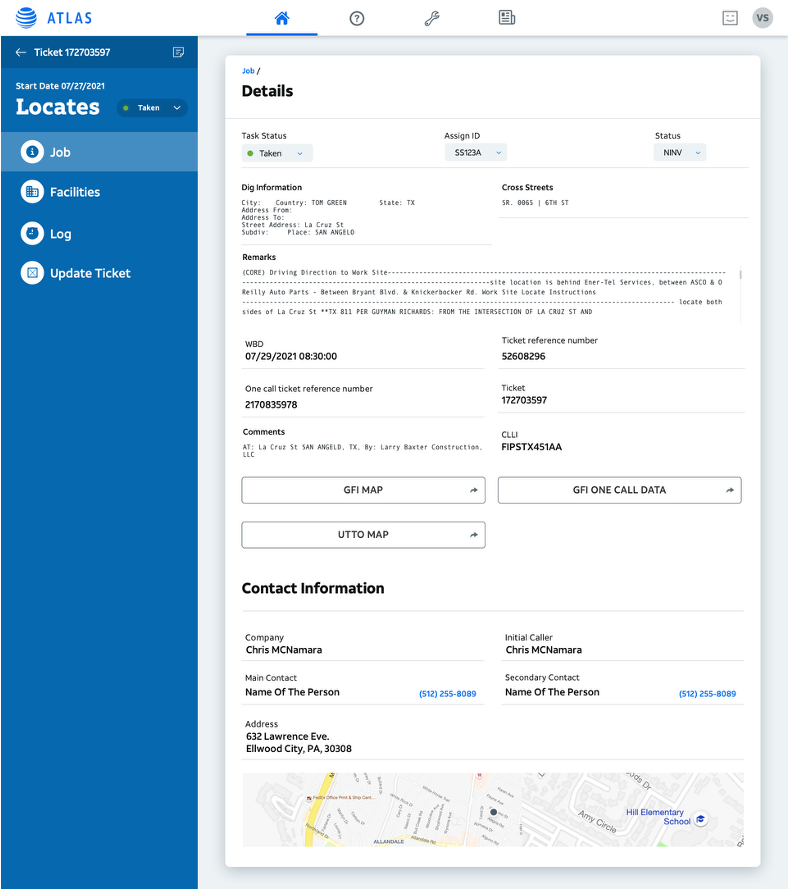
The research led to a set of focused recommendations to improve usability and workflow clarity:
- Introduce clear visual indicators for emergency and high-priority tickets
- Prioritize critical information such as address, cross street, and status
- Enable key actions directly from the worklist
- Surface newest and most urgent tickets more prominently
- Merge job details and contact information into a single view
These changes aligned the interface with how technicians actually work—supporting faster decisions and reducing friction across tasks.